
If you’ve tried configuring SharePoint to correctly use Excel Services in a Farm under Kerberos, you know that it can be a bit fiddly. Essentially the steps are:
Configure Kerberos correctly for the Farm, and ensure it is working correctly. The defacto blog entry is probably this one from Martin Kearn. Once you have this working, you’ve half a chance to get Excel Services working correctly. Key points I found helped was to run the following stsadm commands:
stsadm -o set-ecssecurity -accessmodel delegation -ssp <sspname>
stsadm -o execsvcadmjobs
iisreset
iisreset
This ensures that the Excel Services is using Kerberos as its authentication method.
If you have a data connection file make sure it is within a data connection library, I guess there is some meta-data it needs.
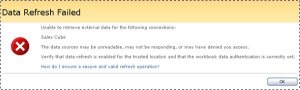
If you still get the dreaded "Data Refresh Failed" message, then this Technet article (possibly one of the longest I’ve ever seen/read) is probably your best bet. It covers SSO as well as Kerberos.
With a combination of these I managed to get it all working a treat!
Good Luck
Dave Mc
PS. If you are connecting to Analaysis Services on a separate machine, don’t forget to also include that machine in the Kerberos setup AND if it is SL 2008 Analysis Services, add in MSOLAP.4 into your Trusted Data Providers in Shared Services Administration.






 Dave Mc's Blog
Leave a comment