
Level: Error
Event Source: System
Event Category: None
Event ID: 10016
OpCode: Info
Logged: 07/01/2010 23:17:19
User: {Sharepoint Farm Account or Web Application AppPool Account}
Computer: {One of Your Computers Name}
Description: The application-specific permission settings do not grant Local Activation permission for the COM Server application with CLSID {61738644-F196-11D0-9953-00C04FD919C1} to the user {Sharepoint Farm Account or Web Application AppPool Account} SID {some SID} from address LocalHost (Using LRPC). This security permission can be modified using the Component Services administrative tool.
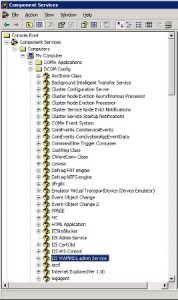
Once you’re there right-click and select Properties, then select the Security Tab and then click the Edit … button in the launch and Activation Permissions section.
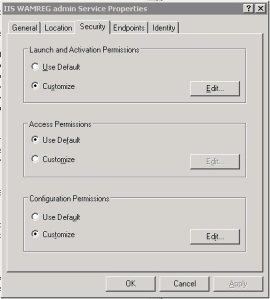
Now you can add the individual account which should be the accounts which run your application pools as I’ve seen elsewhere. I however prefer to add the local groups WSS_ADMIN_WPG and WSS_WPG in instead, as these will automatically deal with any change of account or new accounts which get added later. Then don’t forget to tick the Local Activation for both the new account groups as shown:
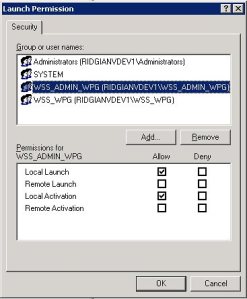
Click OK and then OK again and you’re done. Clear out your Event Log entries if you wish, but you shoudln’t see any more occurances of that error in the event log.
Kerberos Configuration
If you’re configuring Kerberos for your SharePoint farm then this configuration is also required to ensure proper passing of credentials via Kerberos.
Cheers
Dave Mc







 Dave Mc's Blog
Leave a comment