

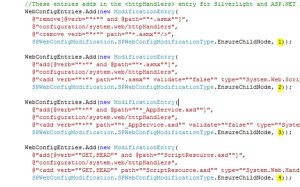
The ModificationEntry is a helper structure to bag up the configuration changes in a collection then submit them to be applied.
Notice the highlighted numbers? That’s the Sequence number which in the MSDN help is described as follows:
“A sequence is used only if there is more than one modification of the same type to the same node or attribute. In this case, modifications with lower sequence numbers are applied first.”
Unfortunately that is incorrect! The sequence numbers seem to have absolutely zero impact, because no matter what I did my web.config would not come out how I wanted. Searching around the internet nearly all examples do not set the sequence number, leaving it a zero. Luckily via Bing my current favourite search engine I found these PowerPoint Slides courtesy of Blake Blackshear of Parivida Solutions. It’s a pretty comprehensive guide to carrying out modifications on the SharePoint web.config and lo and behold the answer I needed was in there. I knew that the modifications were applied with a combination of Name + Xpath, and I could see that they were being applied always in alphabetical order, but some bright spark had thought “Right, we’ll use that!” and so following their example I changed my code to as follows:
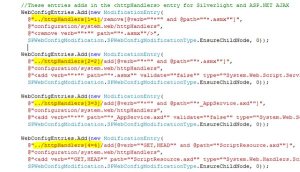
Note the sneaky change to the XPath? Like their style and now my web.config looks just so …
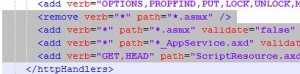
Luverly. Hope this helps someone out. Oh, and I will get that PRISM article done soon …
Cheers
Dave Mc
< DIV>








 Dave Mc's Blog
Leave a reply to niranjanrao Cancel reply