
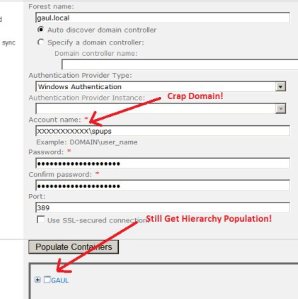
How did I find this out? I use KeePass to store all my Active Directory User Names andPasswords even for demonstration servers. I had recorded the user name of the account for User Profile Synchronisation as DOMAINA\spups (e.g), but the domain I was working on was called DOMAINB (again e.g). I was using the same user name and password for DOMAINB, so I copied and pasted the user name from KeePass into the above Account Name input box BUT I FORGOT TO CHANGE THE DOMAIN! The Populate Containers button worked fine and gave me the domain hierarchy even though the user DOMAINA\spups DID NOT EXIST ON DOMIANB obviously. When I went to create the connnection by clicking OK, I got the "Unable to process Create message" error. When I spotted the error, I corrected the domain name and everything worked fine.
Hopefully that is clear, the main points to remember are:
1. Make sure you follow Spence’s blog post step by step.
2. Just because you get the hierarchy displaying after you click "Populate Containers" do not assume that you have correctly configured the account used by Forefront Identity Manager to connect to the AD forest, any valid username and password will result in the AD hierarchy being shown.
I’m just trying to clarify with Microsoft whether this qualifies as a bug, probably not, but hopefully this post might help somebody in some way …
Cheers
Dave Mc








 Dave Mc's Blog
Leave a reply to Fix Firefox Error Message Unable To Connect Errors – Windows XP, Vista, 7, 8 Cancel reply