
I’ve been struggling with getting JavaScript Intellisense to work on and off over the last few months. I keep trying, finding it not working, so I go and do something else instead. But I’m involved in a small project right now in which I was determined to get it working and finally, I have found a reliable way to do just that, thanks to this very useful link on The Code Project.
So most blogs say just to add in a JavaScript comment/reference like below (The C:\14 directory is a symbolic link to the C:\Program Files\Common Files\Microsoft Shared\Web Server Extensions\14 folder created using the standard windows mklink command line – thanks to Chakkaradeep Chandran for this nugget) :
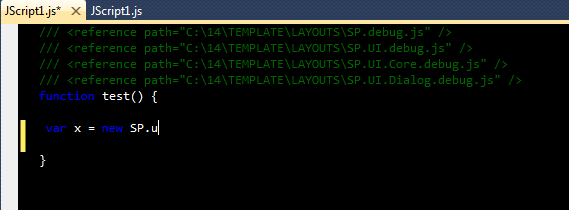 Intellisense NOT working despite the reference comments!
This should work but never has for me, as can be seen in the image, I should be getting suggestions relating to UI, Dialog etc, but nothing is apparent. What I needed and was pointed out in The Code Project article is that there is an additional reference required here to MicrosoftAjax.js. Where the heck is this located? Well it’s actually an embedded reference in the System.Web.Extensions DLL, which is part of the .NET Framework 3.5.
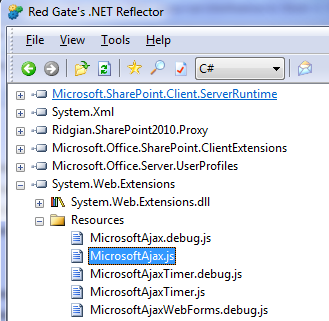 Locating the origin of MicrosoftAjax.js
So by adding in an additional reference comment so:
/// <reference name="MicrosoftAjax.js" />
(Note the attribute ‘name’ not ‘path’!) then pressing Cntl + Shift + J which updates the JavaScript Intellisense in VS2010 and trying again, suddenly the wonderful Javascript Intellisense clicked in and I saw this:
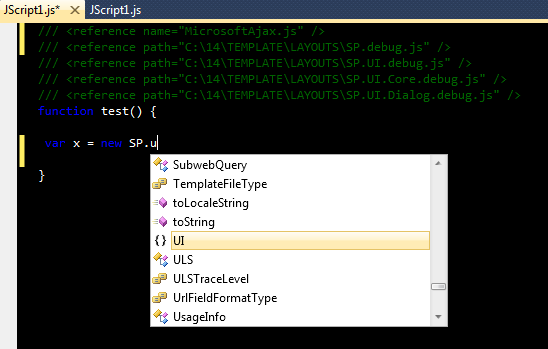 Intellisense WORKING with the additional reference comment!
About time too! There is one downside and that is it only works when the JavaScript file is in the root of the project, a little annoying, but not the end of the world. It’s only taken me several months to get to this stage. So I hope this helps someone, somewhere with this issue.
Cheers
Dave Mc








 Dave Mc's Blog
Leave a reply to Max Donovan Cancel reply