
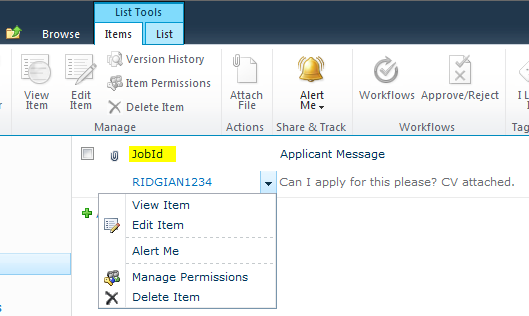
One of the things that we’ve often wanted to do in SharePoint 2010 is to not have to have the Edit Control Block or ECB attached to the Title field, if you’re not sure what the ECB is, it’s that drop down menu on the standard List View page. For instance, recently I wanted it attached to a field called JobId.
In SharePoint 2007, this was a bit of a fag to change, I’ve seen various blog posts about it, but never found a reliable method. Now it’s pretty simple. You can do it through SharePoint Designer 2010 very easily, but if you want to build a custom list template with everything already configured it’s also simple. But it’s not well advertised!! So this took me about 2-3 days to track down, and I hope that me putting this up here will save you a bunch of time.
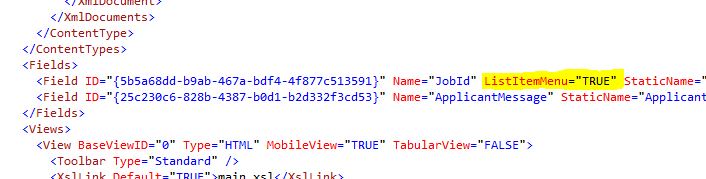
In your List Definition Schema.xml, identify the field you want to attach the ECB to and add in the following attribute:
ListItemMenu=”TRUE”
Here’s a screenshot of a List Template Schema for you.
And here’s the result:
Hope that helps somebody
Cheers
Dave Mc








 Dave Mc's Blog
Leave a reply to Alex Cancel reply